Ingress and Workloads
Cosmonic Control uses Envoy as its HTTP ingress proxy and a set of Kubernetes CRDs for declaring workloads. This page explains how to configure ingress and deploy WebAssembly workloads.
What are Cosmonic Control deployment manifests?
Deploying a workload to Cosmonic Control is the same as deploying any other resource to Kubernetes: declarative Custom Resource Definition (CRD) manifests written in YAML.
Workload manifests can be applied manually with kubectl and managed in GitOps pipelines with tools like Argo CD. Manifests are composed according to the runtime.wasmcloud.dev/v1alpha1 API.
How to manage ingress with Envoy
Envoy is deployed alongside Cosmonic Control as a standard Deployment. The user-facing Kubernetes service is named ingress (not envoy). Envoy routes incoming HTTP requests to Wasm workloads based on the Host header.
The example below configures Envoy for a network load balancer on AWS as part of an Argo CD Application manifest:
apiVersion: argoproj.io/v1alpha1
kind: Application
metadata:
  name: cosmonic-control
  namespace: argocd
spec:
  project: default
  source:
    ...
    helm:
      values: |
        ...
        envoy:
          service:
            type: LoadBalancer
            annotations:
              service.beta.kubernetes.io/aws-load-balancer-type: nlb
              service.beta.kubernetes.io/aws-load-balancer-scheme: internet-facing
  destination:
    name: in-cluster
    namespace: cosmonic-system
  ...
With this configuration, an ingress service is available with an external IP address. The load balancer connects to Envoy pods, which route requests to the WebAssembly component matched by the incoming Host header. If the component is running on multiple hosts, requests are load balanced round-robin. If a host crashes, it is removed from the rotation and the component continues to serve on the remaining hosts.
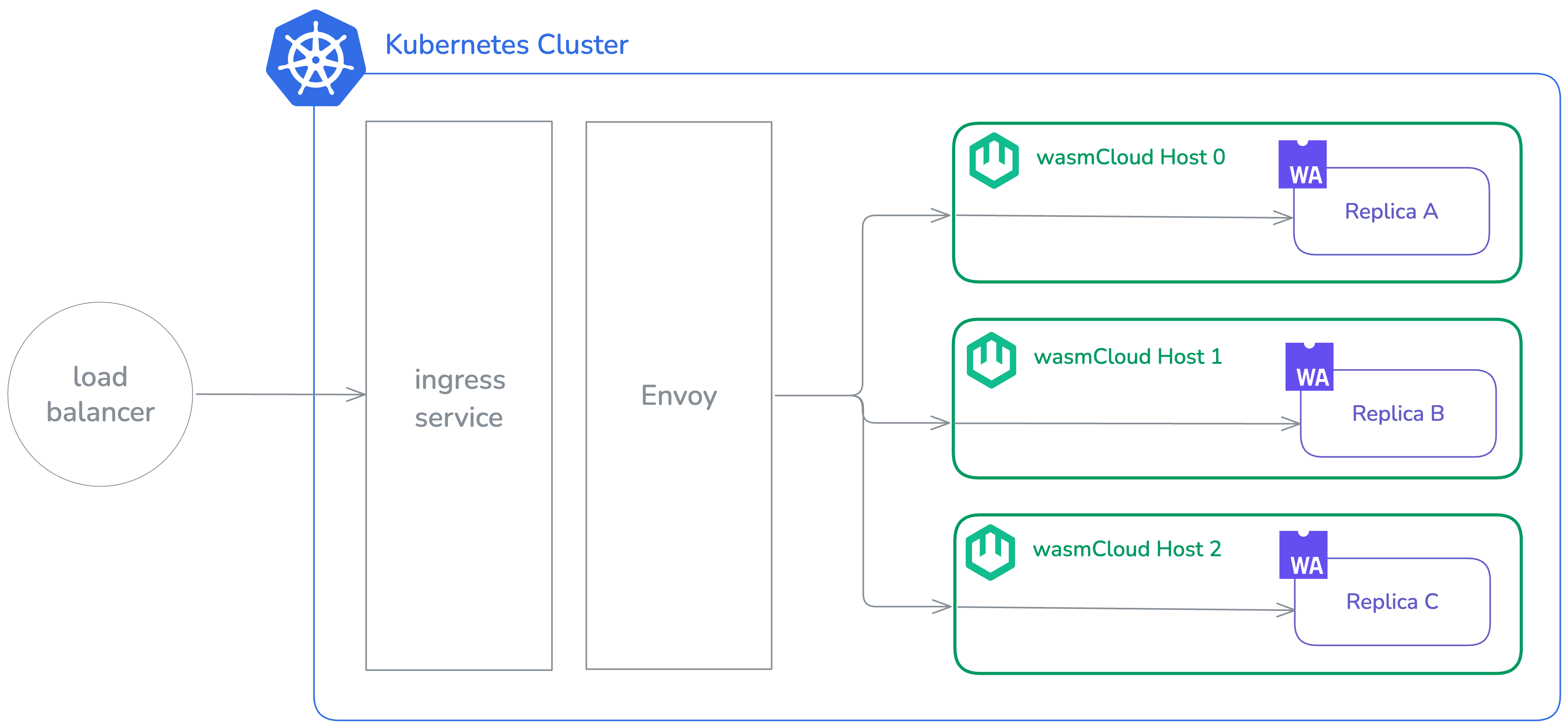
Request flow
When a request arrives, Envoy processes it as follows:

Envoy's routing configuration is managed by the XDS cache service, which polls for changes at a configurable refresh interval and pushes updated snapshots to Envoy via gRPC.
Configuring Envoy as a proxy with TLS
Envoy handles plain HTTP. TLS termination is handled upstream—for example, by Cloudflare or a cloud load balancer.
Configure your TLS-terminating proxy to forward requests to the Envoy ingress service in plain HTTP. A service like Cloudflare manages its own certificates, so operators don't need to store certificates in the cluster or manage their renewal.
How to deploy WebAssembly workloads with ingress
HTTP-driven WebAssembly workloads are deployed using the HTTPTrigger CRD. The minimum required fields per component are:
name: Name of the componentimage: OCI address for the component image
Additional interfaces (beyond wasi:http) and the ingress host are typically supplied as a values file for the HTTPTrigger Helm chart:
components:
  - name: blobby
    image: ghcr.io/cosmonic-labs/components/blobby:0.2.0

ingress:
  host: 'blobby.wasmworkloads.io'

hostInterfaces:
  - namespace: wasi
    package: blobstore
    version: 0.2.0-draft
    interfaces:
      - blobstore
  - namespace: wasi
    package: logging
    version: 0.1.0-draft
    interfaces:
      - logging
In an Argo CD deployment:
apiVersion: argoproj.io/v1alpha1
kind: Application
metadata:
  name: demo-hello
  namespace: argocd
spec:
  project: default
  source:
    path: .
    repoURL: oci://ghcr.io/cosmonic-labs/charts/http-trigger
    targetRevision: 0.1.2
    helm:
      values: |
        components:
          - name: http
            image: ghcr.io/cosmonic-labs/control-demos/hello-world:0.1.2
        ingress:
          host: "hello.localhost.cosmonic.sh"
  destination:
    name: in-cluster
    namespace: hello
  syncPolicy:
    automated:
      prune: true
      selfHeal: true
    syncOptions:
      - ServerSideApply=true
      - CreateNamespace=true
      - RespectIgnoreDifferences=true
    retry:
      limit: -1
      backoff:
        duration: 30s
        factor: 2
        maxDuration: 5m
This creates an HTTPTrigger resource:
apiVersion: control.cosmonic.io/v1alpha1
kind: HTTPTrigger
metadata:
  name: example
  namespace: default
spec:
  replicas: 1
  ingress:
    host: 'hello.localhost.cosmonic.sh'
    paths:
      - path: /
        pathType: Prefix
  template:
    spec:
      components:
        - name: http
          image: ghcr.io/cosmonic-labs/control-demos/hello-world:0.1.2
Using multiple HTTPTriggers with the same host but different paths, you can route different workloads to different paths on the same domain.
The HTTPTrigger creates and manages a WorkloadDeployment pre-populated with the interfaces for an HTTP incoming handler. The WorkloadDeployment manages Workload and WorkloadReplicaSet resources.
Path matching
Each entry in spec.ingress.paths requires a path and a pathType. Two path types are supported, following the Kubernetes HTTPIngressPath spec:
Exact — The request path must match exactly.
paths:
  - path: /api/users
    pathType: Exact
/api/users matches only /api/users. /api/users/123 does not match.
Prefix — The request path must begin with the specified prefix.
paths:
  - path: /api
    pathType: Prefix
/api matches /api, /api/users, and /api/v1/users.
PathTypeImplementationSpecific is not supported. Triggers using any path type other than Exact or Prefix will be skipped during route resolution.
Conflict detection
No two HTTPTriggers may register the same (host, path) combination. If a conflict is detected during route resolution, the conflicting trigger is skipped and an error is logged. To avoid conflicts, ensure each trigger uses a unique combination of host and path.
Further reading
- Browse the Template Catalog for more
HTTPTriggerandWorkloadDeploymentexamples. - See Custom Resources for the full CRD reference.
- See GitOps with Argo CD for a complete GitOps workflow.
Many existing wasmCloud applications include OAM-formatted YAML manifests designed for vanilla wasmCloud deployments. These OAM manifests are not Kubernetes-native and are not to be confused with the CRD manifests used by Cosmonic Control. (OAM manifests can be identified by the API version core.oam.dev/v1beta1.)